이 글은 2026년 1월 21일에 작성된 글입니다.
이벤트
사용자가 웹 브라우저에서 DOM 요소들과 상호 작용하는 것.
DOM요소에만 이벤트 설정이 가능(컴포넌트에 자체적으로 이벤트를 설정할 수는 없다).
예제: 함수형 컴포넌트로 이벤트 구현
// src/ex04/EventEx.js

import React, {useState} from 'react';

const EventEx = () => {
    const [form, setForm] = useState({
        username: '',
        message: ''
    });
    const {username, message} = form;
    // 이벤트 발생하면 form 변경
    const onChange = e => {
        const nextForm = {
            ...form, // 기존의 form 내용을 이 자리에 복사 한 뒤
            [e.target.name]: e.target.value // 원하는 값을 덮어씌우기
        };
        setForm(nextForm);

    };
    // username과 message 확인하고 form 초기화
    const onClick = () => {
        alert(username + ': ' + message);
        setForm({
            username: '',
            message: ''
        });
    };
    // Enter 키 누르면 onClick 함수 실행
    const onKeyPress = e => {
        if(e.key === 'Enter') {
            onClick();
        }
    };

    return (
        <div>
            <h1>이벤트 연습</h1>
            <input
            type="text"
            name="username"
            placeholder="유저명"
            value={username}
            onChange={onChange}
            />
            <input
            type="text"
            name="message"
            placeholder="아무거나 입력해보세요"
            value={message}
            onChange={onChange}
            onKeyPress={onKeyPress}
            />
            <button onClick={onClick}>확인</button>
        </div>
    );
};

export default EventEx;

생명주기
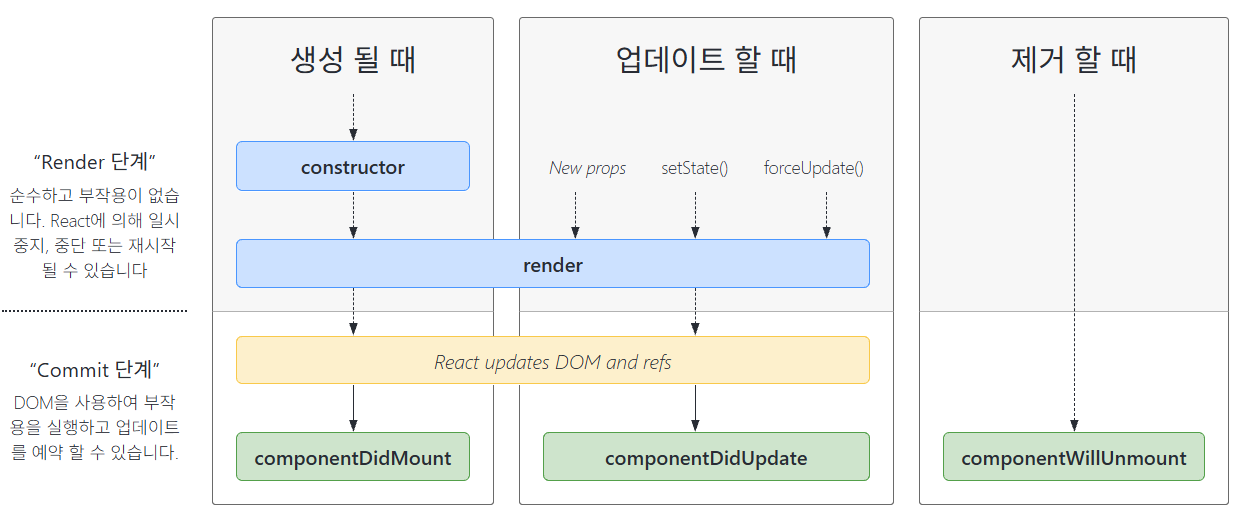
리액트 컴포넌트의 생명주기(lifecycle)
- 마운트 (Mount) - 컴포넌트가 최초로 생성되어 DOM에 삽입되고 브라우저에 그려지는 시점
- 업데이트(Update) -
state나props가 변경되어 컴포넌트가 다시 렌더링되는 모든 과정 - 언마운트(Unmount) - 컴포넌트가 DOM에서 제거되는 시점
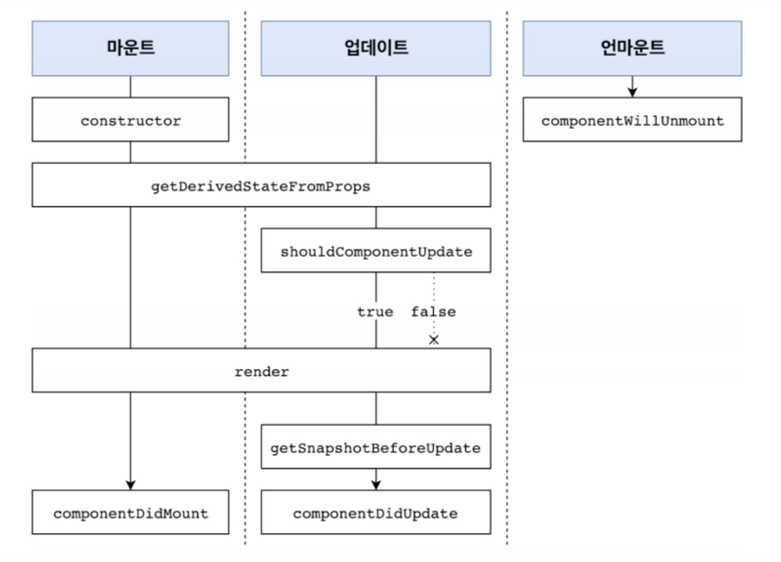
컴포넌트의 생명주기 메서드 흐름
예제: 1초마다 알림 데이터를 가져와서 메세지 출력하기
// src/ex04/Notification.jsx

import React from "react";

// styles 정의는 길이상 생략 (실제론 있어야 함)

class Notification extends React.Component {
    constructor(props) {
        super(props);
        this.state = {}; // state 초기화
    }
    componentDidMount() {
        console.log(`${this.props.id} componentDidMount() called.`);
    }
    componentDidUpdate() {
        console.log(`${this.props.id} componentDidUpdate() called.`);
    }
    componentWillUnmount() {
        console.log(`${this.props.id} componentWillUnmount() called.`);
    }
    render() {
        return (
            <div style={styles.wrapper}>
                <span style={styles.messageText}>{this.props.message}</span>
            </div>
        );
    }
}

export default Notification;
// src/ex04/NotificationList.jsx

import React from 'react';
import Notification from './Notification';

const reservedNotifications = [
    {
        id: 1,
        message: "안녕하세요, 오늘 일정을 알려드립니다.",
    },
    {
        id: 2,
        message: "점심식사 시간입니다.",
    },
    {
        id: 3,
        message: "이제 곧 수업이 시작됩니다.",
    },
];

var timer;

class NotificationList extends React.Component {
    constructor(props) {
        super(props);
        this.state = {
            notifications: [],
        };
    }
    // 1초마다 알림데이터를 가져와서 state의 배열에 넣고 업데이트
    // state 업데이트를 위해 setState 사용
    componentDidMount() {
        const {notifications} = this.state;
        timer = setInterval(() => {
            if (notifications.length < reservedNotifications.length) {
                const index = notifications.length;
                notifications.push(reservedNotifications[index]);
                this.setState({
                    notification: notifications,
                });
            } else {
                this.setState({
                    notification: [],
                });
                clearInterval(timer);
            }
        }, 1000);
    }

    componentWillUnmount() {
        if (timer) {
            clearInterval(timer);
        }
    }

    render() {
        return (
            <div>
                {this.state.notifications.map((notification) => {
                    return (
                        <Notification key={notification.id}
                        id={notification.id}
                        message={notification.message} />
                    )
                })}
            </div>
        );
    }

}

export default NotificationList;
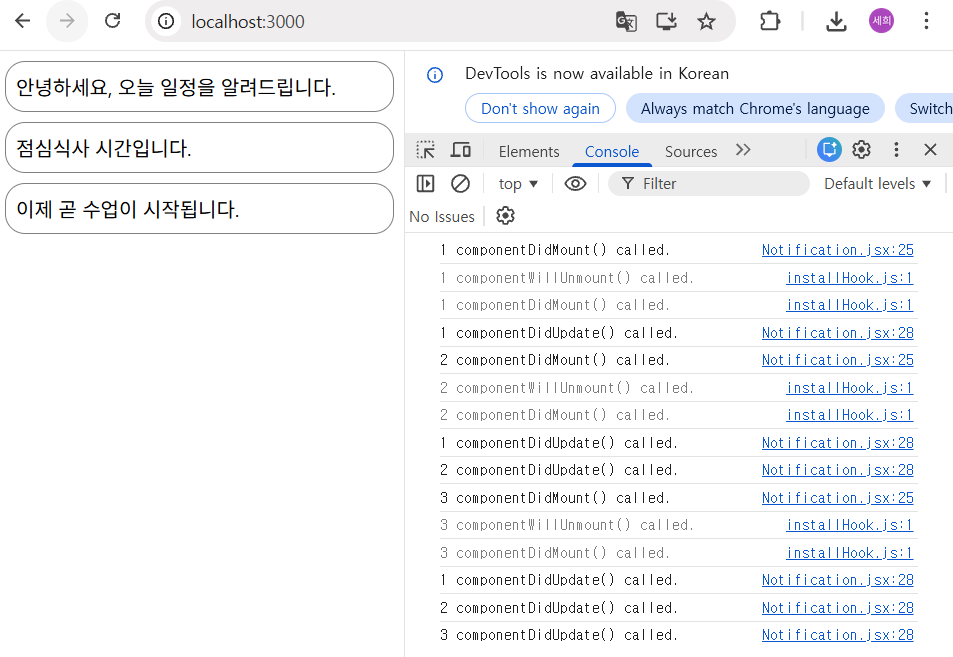
마지막으로 src/App.js에서는 NotificationList를 import하고 return 하면?
Hook
리액트의 state와 생명주기 기능에 갈고리를 걸어 원하는 시점에 정해진 함수를 실행되도록 만든 것.
- 기존의 함수형 컴포넌트에서 할 수 없었던 다양한 작업이 가능하게 해준다.
- 훅의 이름은 모두 훅이 수행하는 기능에 따라 use로 시작된다.
예제: useState() 여러번 사용하기
// src/ex05/Info.jsx

import React, {useState} from 'react';

const Info = () => {
    const [name, setName] = useState('');
    const [nickname, setNickname] = useState('');
    const onChangeName = e => {
        setName(e.target.value);
    }
    const onChangeNickname = e => {
        setNickname(e.target.value);
    }
    return (
        <div>
            <div>
                <input name="name" value={name} onChange={onChangeName} />
                <input name="nickname" value={nickname} onChange={onChangeNickname} />
            </div>
            <div>
                <div><b>이름: </b> {name} </div>
                <div><b>닉네임: </b> {nickname} </div>
            </div>
        </div>
    );
};

export default Info;
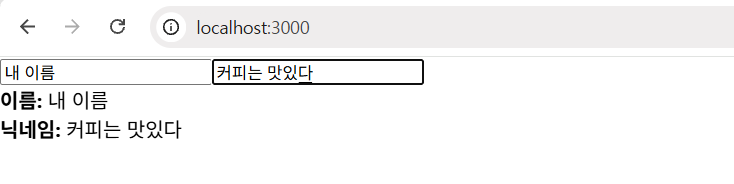
그리고 App.js도 Info로 바꿔주면 input에 텍스트를 쓸 때마다 밑에 텍스트가 바뀜.
❕느낀점
어제 거를 복습하면서 뭔가 이제야 리액트에 대해 좀 알게 된 것 같다. 처음엔 폴더랑 파일도 너무 많고, App.js, index.js 두 파일의 쓰임도 잘 구분이 안됐었는데 이제야 얼추 알 것 같은 느낌.
Notification 예제에서 화면 출력이 이상하게 되길래 확인해봤더니 state의 필드를 noficitations로 해야 되는데 s를 빼먹어서 그런거였다..ㅋㅋㅋ 한 글자로 인해 실행 여부가 결정될 수 있으니 늘 오타 조심❗
프로젝트를 리액트로 할 수 있을까..? ㅎ... 화이팅
'Frontend' 카테고리의 다른 글
| [TIL-260122] React 기초: Hook과 SPA, todo 앱 만들기 실습 (0) | 2026.02.16 |
|---|---|
| [TIL-260120] React 기초: JSX, 컴포넌트, state (0) | 2026.02.16 |
| [TIL-260119] 모던 자바스크립트 기초 문법, React 환경설정 (0) | 2026.02.16 |
| [TIL-260116] 모던 자바스크립트 기초 문법: 변수 선언부터 분할 대입까지 (0) | 2026.02.15 |
| [TIL-260115] jQuery: Form Element 다루기와 AJAX (0) | 2026.02.15 |